The first hour of an incident, and how much of it I'd give an AI agent
Article · 6 min readHamid Jafari-Zadeh
For more than 13 years I’ve designed and run systems that couldn’t afford to fail, from national payment infrastructure to a global high-availability platform. Whatever my role was, even when I was leading the team, I got paged. At 3 a.m. On weekends. On holidays.
Every engineer who has carried a pager knows the next hour. I want to look at that hour closely, because it’s where AI agents are about to arrive, and because most of it isn’t what people think it is.
What the first hour actually is
From the outside, incident response looks like fixing things. From the inside, the first hour is mostly reading.
You open the laptop half awake. You read the alert, then the dashboards around it. You check whether someone is running maintenance, whether this is a known issue, whether the alert is a false positive that will clear by itself. You read the notes from the previous shift. You connect to one server, then another, and you read logs. You look for what changed recently. You open the runbook, which might be three steps or twenty, and you read it line by line, carefully, because one wrong step at 3 a.m. makes things worse.
Somewhere in that hour you make a decision. Often the fix itself is small: a restart, one configuration value, a failover. Finding it is what takes the hour.
If I sort that hour by what each part does to the system, I get four kinds of work:
- Reading: alerts, dashboards, metrics, logs, recent changes, the runbook, the previous shift’s notes. None of it changes anything.
- Deciding: is action needed at all, what’s the likely cause, which fix fits.
- Changing: the restart, the config change, the failover. This is the only part that can make things worse.
- Telling people: status updates, the incident channel, the postmortem later.
Reading is most of the hour, and it’s also the part that’s safe.
So how much would I hand over?
An AI agent is good at exactly the work that fills that hour: reading a lot of text and numbers quickly, comparing them, and following a written procedure. The question isn’t whether an agent can help. It’s what it should be allowed to do while it helps.
My answer, for each kind of work:
- Reading: all of it, now. An agent that can only read can’t cause an outage. It can do in two minutes what takes a tired human twenty.
- Deciding: the agent proposes, a human decides. I want the agent’s best explanation and its proposed fix, written down, with what it based them on. I don’t want it to act on its own conclusion.
- Changing: only the approved steps, only after approval. The fix can be one action or a short sequence taken from the runbook, but the agent runs exactly those steps, in that order, and nothing else. The approval covers this incident only, and the result is checked afterwards against the real system.
- Telling people: drafts. The agent writes the update; a human sends it.
The difficult part isn’t the agent. It’s the layer around it that makes those rules hold even when the model is wrong, confused, or confidently wrong.
What I built to test this
I’m building that layer. It’s called SEED, and right now it runs against a sandbox service I can break on purpose. The sandbox has three failures I can switch on: a timeout set too low, a feature switched off, and a rate limit being exceeded.
Here is one full run.
1. I break it. I switch off checkout in the sandbox. Test orders start failing with HTTP 503 and the dashboard goes red.
2. I ask for help, the way you’d ask a colleague. In SEED’s console I type: “Hey SEED, the API endpoint is down. Can you check and fix it?“
3. SEED opens a case and reads. Before anything else it creates a case file, so every step can be traced. Then it investigates, and only through read-only tools: the service configuration, the metrics, the health status, the runbook and 50 log records. The model suggests what to look at next, but SEED decides whether that step is allowed. At the end of the investigation, the case says it plainly: no change was made.
4. It finds the cause and proposes a bounded fix. The configuration shows checkout disabled, the health check reports the same failure, and the runbook confirms what that means. From the runbook, SEED proposes the fix: set that one configuration key back to enabled, then reset the scenario. Nothing more, and in that order.
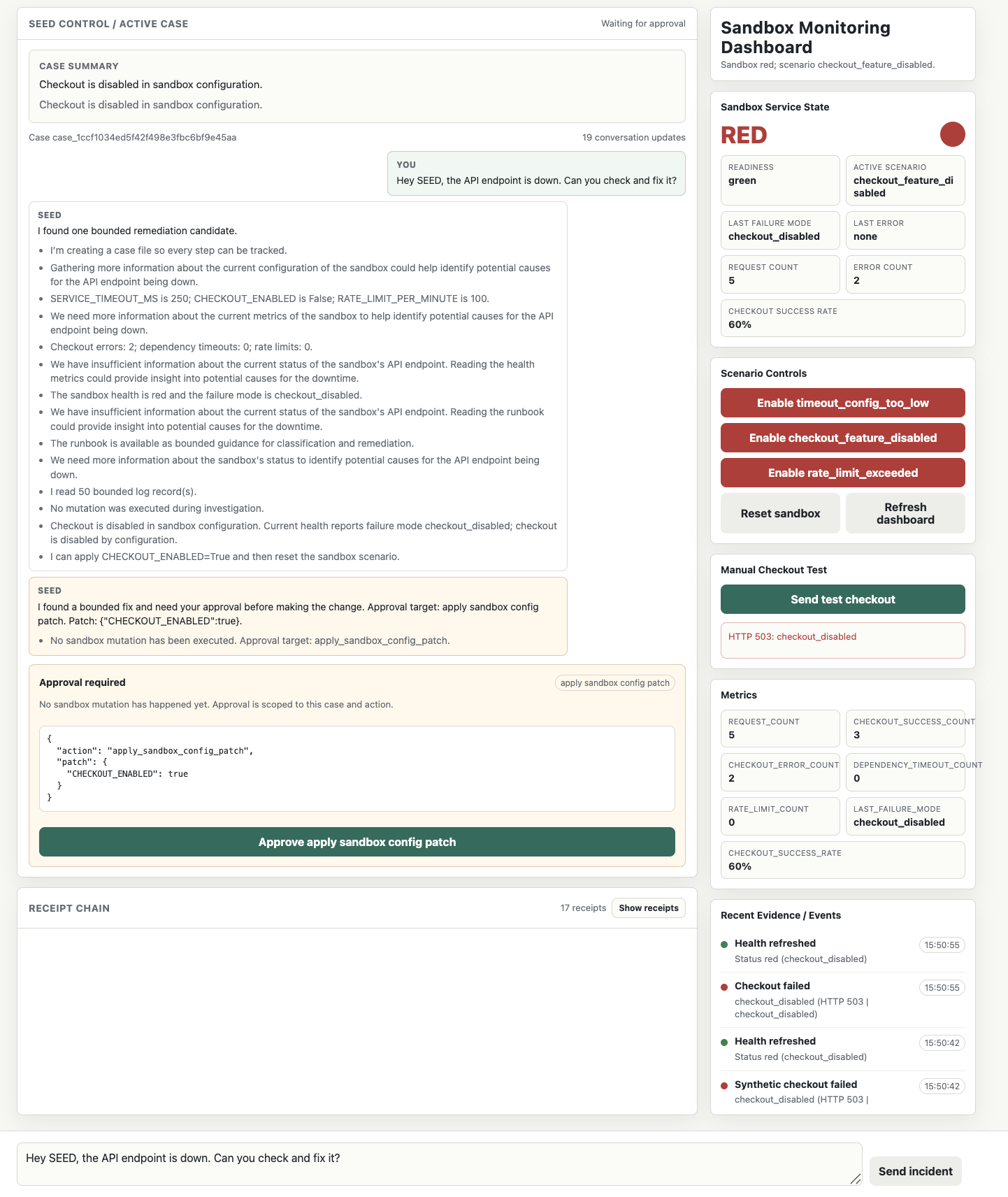
5. It stops and waits. This is the screen I care about most.
The approval panel shows the exact change, not a summary of it. And the approval covers this case and this fix only. Approving it doesn’t let SEED do anything else, now or later (Figure-1).
6. A human approves, and SEED applies, checks and closes. SEED matches the approval to the plan, applies the patch through a tool that can only make that kind of change, resets the scenario, and then verifies against the real system: the health check is green again and a test checkout returns HTTP 200. Only then does it close the case (Figure-2).
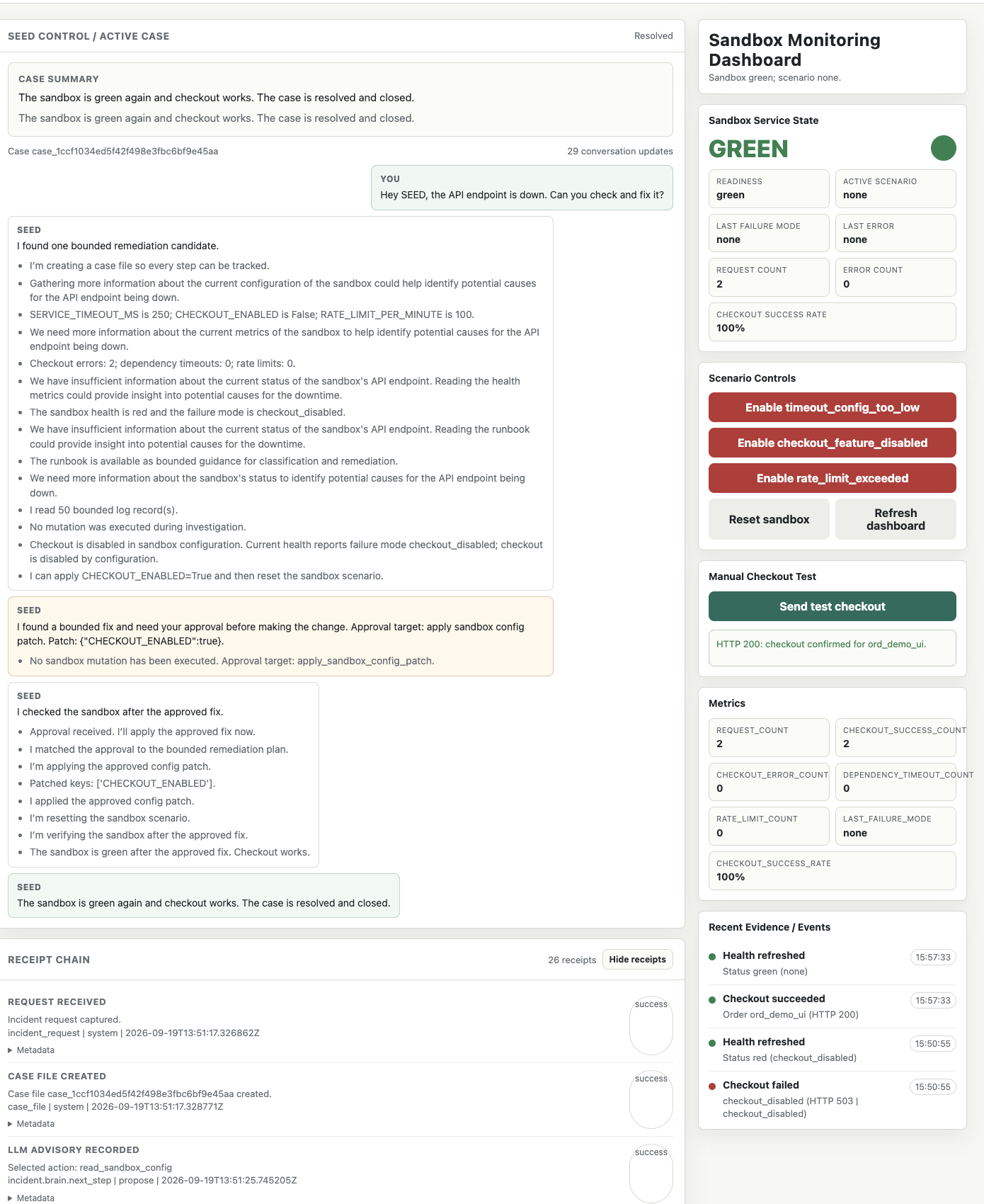
7. Everything leaves a receipt. That case produced 26 receipts, from the first request to the final check. Each one is a structured record of one step: what happened, who or what did it, when, and with what result. If someone asks the next morning “what did the agent do last night, and who allowed it?”, the answer is written down, not reconstructed from memory.
Why the agent doesn’t get more
The model inside SEED can be wrong. It can misread a log line, pick the wrong cause, or suggest a fix that would make things worse. I don’t try to make that impossible, because I can’t. I make it harmless:
- While it’s investigating, it can’t change anything.
- When it’s wrong about the cause, a human sees the exact proposed change before anything happens.
- When the change doesn’t fix the problem, the check after the change catches it, and the case stays open.
- Afterwards, the receipts show what it did, separately from what it says it did.
An agent near production doesn’t need blind trust. It needs boundaries, approval, and a way to show its work.
What this doesn’t do yet
I’d rather say this myself than have you find it:
- It’s a sandbox, with three failures I can switch on. Real incidents are messier, and the first real environment will teach me things the sandbox can’t.
- It’s one agent. Once several agents work together, you need to know which agent’s output led to which action. The receipts don’t yet link every step to the step that caused it, and that’s the next thing I’m building.
- Approval is only as good as the person approving. A human who clicks “approve” without reading is a weak control. Keeping each approval small and showing the exact change helps, but it doesn’t solve that by itself.
The part I’d hand over first
If I could hand over one thing tomorrow, it would be the reading: the alert, the dashboards, the logs, the recent changes and the runbook, gathered and summarised before I’ve even opened the laptop. Not the fix. The fix can wait the two minutes it takes me to read what the agent found and approve it.
If you’ve carried the pager: which part of that first hour would you hand over first? And what would an agent need to show you before you’d let it?